Remove people from photos
Person removal service deals with removal of unwanted people ruining a perfect photo. Our professional editors help you remove people from photos while keeping the background clean, realistic, and natural. No awkward blanks and no visible edits, just a polished final image that looks exactly right.
Whether you’re figuring out how to remove person from photo, need to edit out a person in a photo, or want to clean up distracting people from the background, every image is edited manually with care and precision. From travel crowds to random passersby, the result stays clean, believable, and professionally finished.
Slide to view before and after.


Our Person Removal Services
1. Remove Unwanted people from Images
We erase unwanted people from pictures. Whether they are people you don’t belong to anymore or want to complete your group photos. Distracting people can ruin a great image so remove them to make your memories strong and long lasting.
Remove unwanted person from your images whether you’re in public place, a photobomber destroyed your photo, there are strangers in your travel photos, people in your real estate images or there is any animal or pet in your image.


Public Place
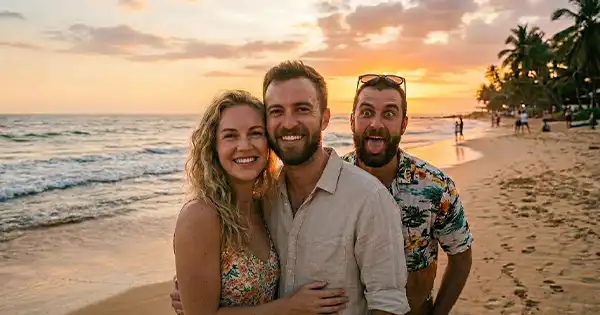
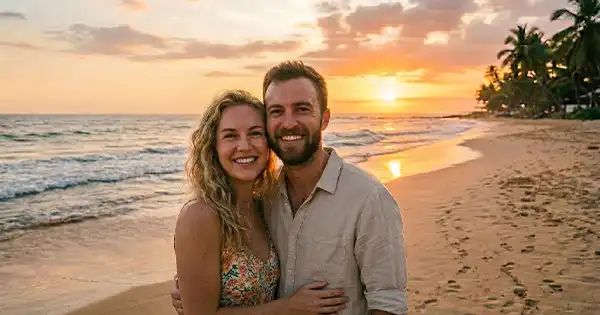
Remove photobombers from pictures
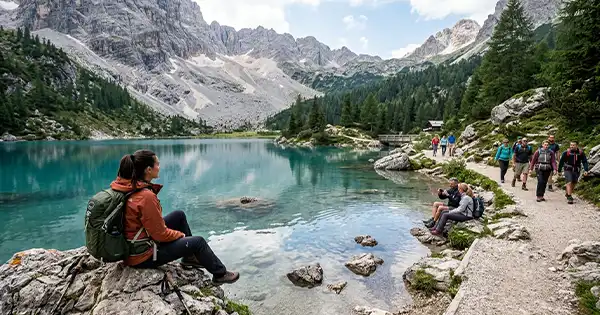
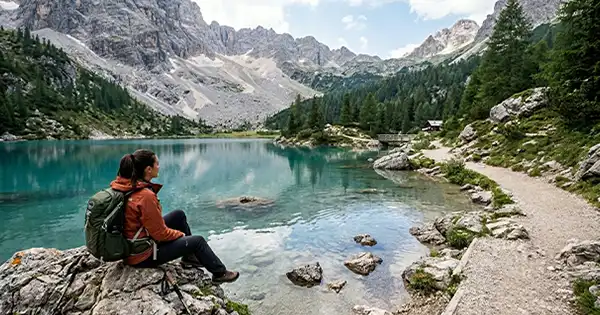
Remove strangers from travel photos

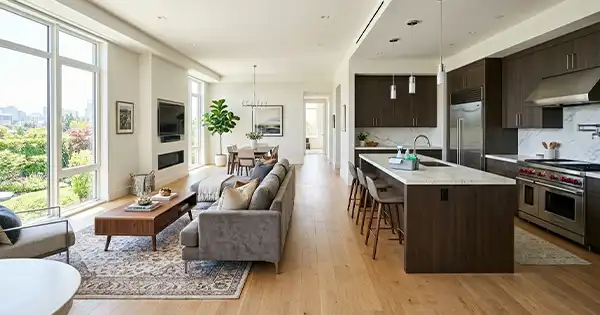
Remove people from real estate images


Remove pet from photo
2. AI Object Remover & Magic Eraser
For quick, seamless edits, we use Photoshop’s Generative AI and manual tools. We don’t use AI Remove Tool or Magic Eraser trick for person removal. We use manual approach to give fine touch to images. Our hybrid approach ensures even tricky objects are erased without a trace.
If you’ve tried AI remover apps and weren’t satisfied, our manual editing ensures the cleanest, most realistic result possible.
3. Manual Retouching & Clone Stamp
From removing people from real estate photos to cleaning unwanted persons in wedding photography, we handle it all. Our service is trusted by photographers, and agencies for precise, natural cleanup that’s print ready and client safe.
Why Our Object Removal Service?
Manual & AI Precision
Every cleanup combines Photoshop expertise and AI object removal tools for flawless results.
Uncompromising Quality
Get commercial grade, professional edits perfect for marketing, social media, or personal use.
Test Edits Before You Pay
Preview your objects removed before paying. Only buy when you’re fully satisfied.
Total Privacy and Security
Your images are kept confidential and never used for AI training or shared with third parties.
Superior to Free AI Tools
Enjoy realistic, consistent results and enhanced privacy-far beyond what free or AI apps can offer.
Fast Turnaround, Responsive Support
We provide fast turnaround time and also we try to response you within 1-2 hrs.
Trusted by Professionals
Our service is relied on by agencies, photographers, and families for quality and discretion.
Tailored Solutions for Unique Needs
We adapt each edit to your specific requirements, from small objects removal to complex object removal services.
How to Place order
Test Edit
Quote Before Editing
Quote Before Editing
Test Edit Approval
Test Edit Approval
Rate Your Experience
Rate Your Experience
Frequently Asked Questions
Yes, we provide objects removal service also. You can click here to get more details about our person removal service.
Yes, we provide free test edits to remove unwanted objects before you pay for it. But, incase you find anything missing related the request, we offer unlimited revisions for it!!
We can edit personal photos, event images, travel pictures, product photos, real estate images, and more. We work with about all extensions (including raw) of images inlcuding jpeg, png, tiff, cr2, cr3, NEF, webp etc.
Select the Clone Stamp Tool, choose a source area (Alt+Click), and paint over the object you want to erase for precise, manual removal. We use it to remove unwanted objects in case ai don't work perfectly!
We edit only using Photoshop. We use stamp clone tool and generative AI in a precise way to make background realistic. We don't use Magic Eraser or any other Ai to remove people from image. Magic eraser is an online platform to remove unwanted objects.
Delivery time depends on the complexity of the image, but most edits are completed within 1-2 hrs. Max is 24 hrs.
Yes, we can handle complex backgrounds, though heavily detailed images may require more editing time.
Yes, your photos are treated confidentially and handled with care.
What affects Pricing and TAT
Each remove someone from a photo request comes with its own challenges, so pricing and turnaround times are customized for every image. The final cost depends on details like background depth, surrounding objects, lighting balance, and how much reconstruction is needed after we delete people from picture scenes. Images with simple, uncluttered backgrounds are quicker to complete, while complex photos that require careful retouching to remove a person from a photo and rebuild missing areas may take additional time.
Our professional editors use advanced techniques to remove person from photo. Photoshop methods are used to erase people from photos cleanly and realistically, delivering results that look completely natural and professionally finished.
Price Lower & Turnaround Faster
These are the conditions that make the price lower and turnaround time faster for person removal service.

Price Higher & Turnaround Slower
These are the conditions that make the price of person removal service higher and turnaround time slower.

Ready to remove people from your photos?
Whether it’s removing unwanted people, extra guests, or distractions from your images, our professional person removal service edits them seamlessly with precision and care. No AI gimmicks, no free tool compromises just stunning, secure, and truly professional skill to remove unwanted people from your family photos.
Try us today and discover why so many clients trust us for photo person removal and image cleanup!
Related Services
Here are the photo editing services related to objects removal service offered by oeditme.
Remove Unwanted Objects | Remove Background | Remove Glass Glare | Remove Hair Stray | Red Eye Removal